
Device Calibration
Calibration falls into two types: gyroscope zero-bias calibration is normally only done after first use, after firmware maintenance, or when something is clearly wrong; full reset and wearing calibration should be done after each re-wearing and after restarting the app.
Gyroscope Zero-Bias Calibration
- Wear the trackers for about 20 minutes before calibrating to reduce errors caused by temperature changes.
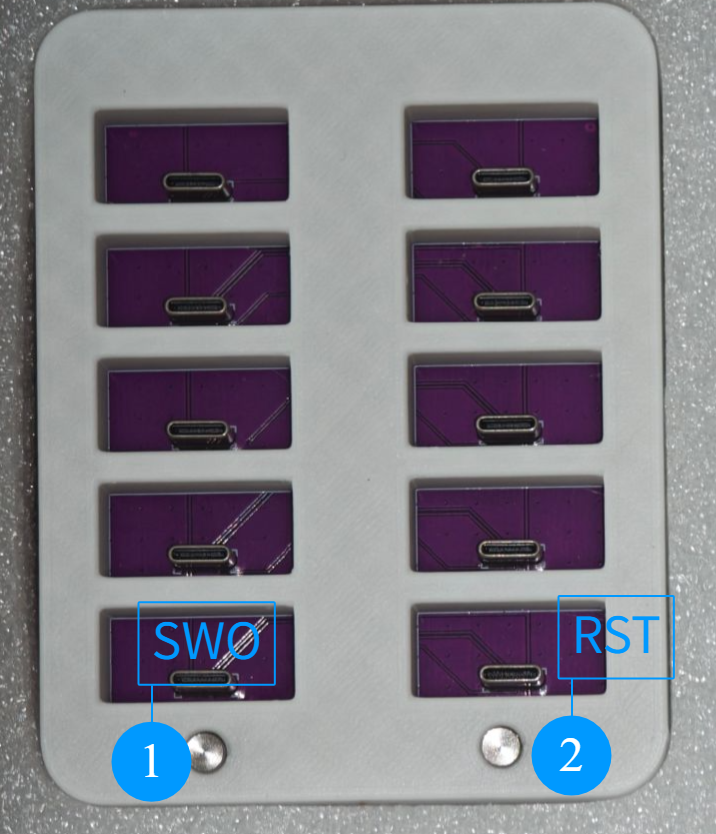
- Keep the trackers on, place all devices into the charging dock as soon as possible, and put the dock on a stable, level surface.
- Double-press the
SW0button on the dock to enter calibration mode; you can also double-press the side button on each tracker. - Keep the time from removing the trackers to finishing calibration within about 1 minute. Do not touch or move the trackers during calibration.
- Calibration is complete when the indicator blinks, stays on for about 6 seconds, then blinks 3-4 times.

Before Each Use
The before-each-use routine (full reset, body wearing calibration, feet calibration) and the in-game calibration are described in VRChat Setup under "Before Each Use".
Still Offset After Calibration
First check whether a device has become loose or shifted during movement, then re-run the full reset and wearing calibration. Do not try to replace calibration by changing several software parameters at once; if it still cannot be resolved, see Troubleshooting.